
Close Menu

    Subscribe to Updates

    Get the latest creative news from FooBar about art, design and business.

    What's Hot

    How To Start the Summer Update In Luma Island

    August 12, 2026

    How To Do Dave The Diver Quest In Luma Island

    August 12, 2026

    How To Unlock The Toe Biter Buggy In Grounded 2 Into The Abyss Update

    August 12, 2026
    Facebook X (Twitter) Instagram
    Patch Crazy
    • Guides
    • Server Status
    • Patch Notes
    • Privacy Policy
    Facebook X (Twitter) YouTube Reddit
    Patch Crazy
    Home»Guides»Where To Get Two Fishing Rods In Pokémon Pokopia Bubbly Basin DLC
    Guides

    Where To Get Two Fishing Rods In Pokémon Pokopia Bubbly Basin DLC

    By NanditaAugust 12, 2026No Comments2 Mins Read
    Share
    Facebook Twitter LinkedIn Pinterest Email

    If you want to start fishing in Pokémon Pokopia, you don’t need to craft every Fishing Rod yourself. You can actually find two Fishing Rods for free in Bubbly Basin. In this guide, we’ll show you where to find both rods and how to set up a Fishing Spot Habitat so you can attract Water-type Pokémon.

    Where To Get Two Fishing Rods In Bubbly Basin

    Both fishing rods are found very easily while exploring Bubbly Basin. After unlocking the DLC and completing the main story quest, which includes building the Ocean Temple, you can explore the surrounding areas to find new decor items, accessories, and new equipment.
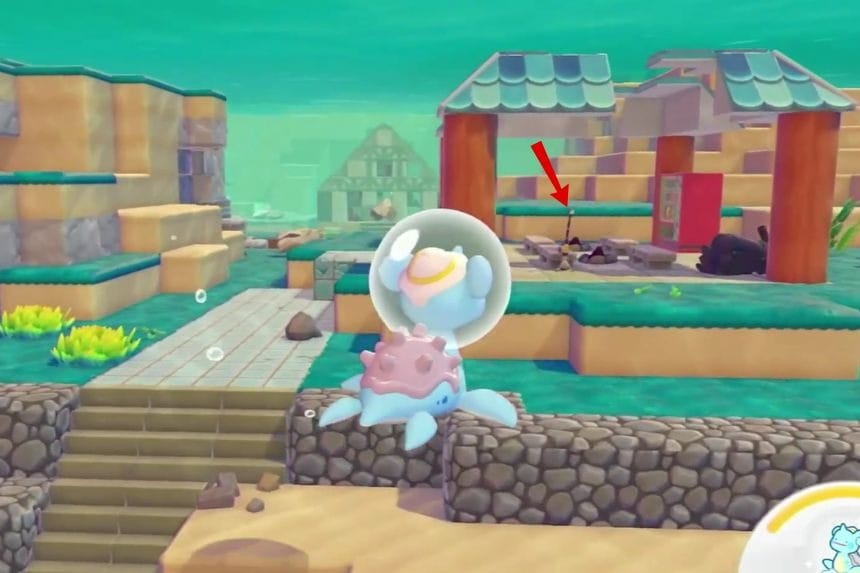
    The first location you can visit is the same place where you spotted Frillish the first time. Go to the Bubbly Basin and move towards the cave-like structure. From there, move opposite towards the camp-like structure. There, inside the structure, you will find a fishing rod.
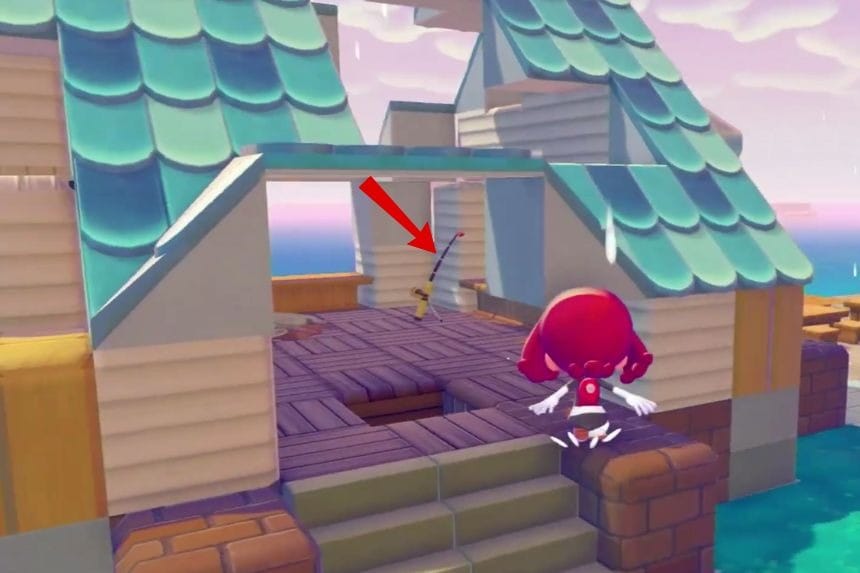
    The next location will be towards the surface. Swim up to the surface to reach an abandoned house with the green roof. There you will find another fishing rod. Now you have two fishing rods without crafting any rod.

    How To Do Fishing

    In Pokémon Pokopia, “fishing” is done mostly by building a specialised Fishing Spot Habitat. To build a Fishing Spot Habitat, put a fishing pole and a chair beside water to find a Water-type Pokémon. Before building your Fishing Pond habitat, here are the things that you need to prepare: 

    • Fishing Rod ×1
    • Any type of Seat ×1
    • Water ×1

    After you get all three, it will be time for you to build your Fishing Pond Habitat. You should look for fresh water or even an ocean shore where you can place your Fishing Rod and your Seat near each other. Make sure that both items are placed beside the water tiles. You can then cast your line and wait until you hook a Water type Pokemon to your line, which will help add more Pokemon to your Pokedex.

    Share. Facebook Twitter Pinterest LinkedIn Tumblr Email
    Nandita
    • X (Twitter)
    • LinkedIn

    Damsel in her own distress, abodes in her imaginary world, and enchanted by the magical realms of Elden Ring. A professional overthinker who loves to weave captivating stories, and is fascinated by the art of doing nothing. When not lost in thought, paints canvases that echo her wildest daydreams!

    Related Posts

    How To Start the Summer Update In Luma Island

    August 12, 2026

    How To Do Dave The Diver Quest In Luma Island

    August 12, 2026

    How To Unlock The Toe Biter Buggy In Grounded 2 Into The Abyss Update

    August 12, 2026

    Crimson Desert Crimson Warden’s Necklace Location

    August 11, 2026
    Add A Comment
    Leave A Reply Cancel Reply

    Editors Picks
    Guides

    How To Start the Summer Update In Luma Island

    By Nandita
    Guides

    How To Do Dave The Diver Quest In Luma Island

    By Nandita
    Guides

    How To Unlock The Toe Biter Buggy In Grounded 2 Into The Abyss Update

    By Nandita
    Guides

    Where To Get Two Fishing Rods In Pokémon Pokopia Bubbly Basin DLC

    By Nandita
    Guides

    Crimson Desert Crimson Warden’s Necklace Location

    By Nandita
    Patch Crazy
    Facebook X (Twitter) Instagram Pinterest Vimeo YouTube
    • Home
    © 2026 PatchCrazy.

    Type above and press Enter to search. Press Esc to cancel.