
Close Menu

    Subscribe to Updates

    Get the latest creative news from FooBar about art, design and business.

    What's Hot

    How to Use the Crossbow in Freemode in Half Sword

    February 3, 2026

    How to Get Map Tools in Of Ash and Steel

    February 3, 2026

    Bloodedge Demon Boss Guide in Nioh 3

    February 3, 2026
    Facebook X (Twitter) Instagram
    Patch Crazy
    • Guides
    • Server Status
    • Patch Notes
    • Featured
    • News
    • Reviews
    Facebook X (Twitter) Instagram
    Patch Crazy
    Home»Guides»Keeping the Memory Quest Guide in ARC Raiders
    Keeping the Memory Quest Guide in ARC Raiders
    Guides

    Keeping the Memory Quest Guide in ARC Raiders

    By SankarNovember 2, 2025Updated:November 20, 2025No Comments2 Mins Read
    Share
    Facebook Twitter LinkedIn Pinterest Email

    In Keeping the Memory, you will help Celeste with a task. This isn’t a quest about fighting or collecting loot; it’s one of honouring the fallen. After a moment of reflection on her past, during the First Wave, Celeste asks you to recover a lost helmet from the Formical Hills and return it to a memorial. It’s a short mission in ARC Raiders. Here’s how to complete it.

    Keeping the Memory Quest Guide

    You get the quest “Keeping the Memory” from Celeste in the Dam Battlegrounds area. She’s a bit emotional in giving this to you, admitting she lost her temper earlier. The mission is personal for her; it’s tied to memories of the First Wave, a time when many people were lost. She wants you to understand what that meant to her, which sets the tone for this small but heartfelt quest.

    Your mission brings you to the Formical Hills to make your way to a site of wreckage in search of a missing helmet. Once found, your task is to return the helmet to a nearby memorial to the fallen.

    Step 1: Head to the Wreckage
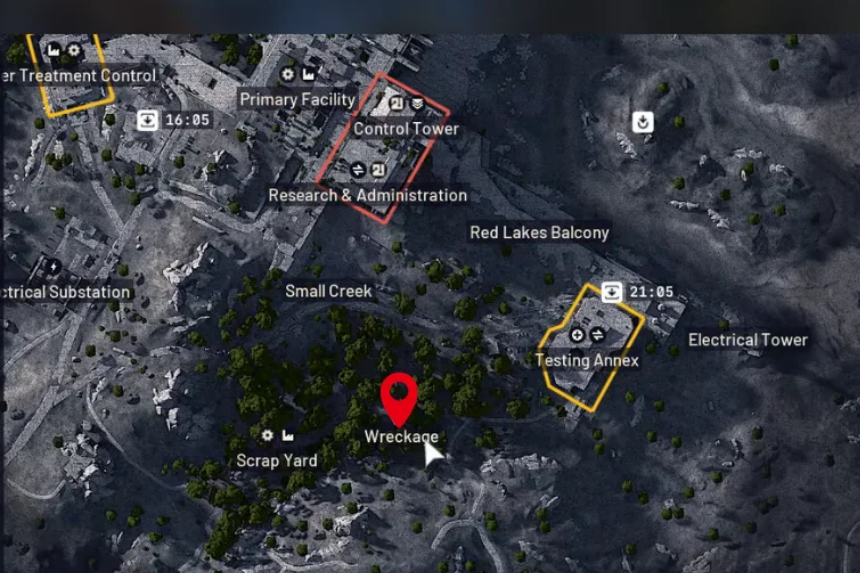
    Open your map and set a waypoint for the Formical Hills. When you get there, you’ll be able to easily see where the wreckage is-an enormous spider-like robot in ruins is hard to miss.

    What We Left Behind Quest Guide: ARC Raiders

    Step 2: Find the Hidden Helmet

    Your main goal here is to find a helmet that’s tucked away near the wreckage.

    • Look around the area carefully; it’s hidden behind a bush, right next to the large spider bot.
    • When you get close, you’ll see a “Quest Item” prompt appear.
    • Pick it up to collect the helmet.

    Once you’ve got the helmet, head over to the memorial rod or pole nearby. Interact with it to place the helmet. That’s it, the quest completes right after. When you complete the quest, you’ll receive a few useful materials as a reward: Simple Gun Parts, Duct Tape, and a Magnet, each valuable for crafting and repairs.

    Share. Facebook Twitter Pinterest LinkedIn Tumblr Email
    Sankar
    • X (Twitter)
    • LinkedIn

    Decided that degrees were as useful as extra lives in a Mario game-totally unnecessary! I’m diving into the extravagant universe of my favourite game, Assassin’s Creed, which lets me roam the world without actually paying for plane tickets. Hodophile by nature and aspiring to get lost in Hang Sơn Đoòng cave in Vietnam someday!

    Related Posts

    How to Use the Crossbow in Freemode in Half Sword

    February 3, 2026

    How to Get Map Tools in Of Ash and Steel

    February 3, 2026

    Bloodedge Demon Boss Guide in Nioh 3

    February 3, 2026

    How To Save Holly (Timeline Shift Decision) – Code Vein 2

    February 3, 2026
    Add A Comment
    Leave A Reply Cancel Reply

    Editors Picks
    Guides

    How to Use the Crossbow in Freemode in Half Sword

    By Sankar
    Guides

    How to Get Map Tools in Of Ash and Steel

    By Nandita
    Guides

    Bloodedge Demon Boss Guide in Nioh 3

    By Sankar
    Guides

    How To Save Holly (Timeline Shift Decision) – Code Vein 2

    By Harry S
    Guides

    How To Save Josee in Code Vein 2 

    By Harry S
    Patch Crazy
    Facebook X (Twitter) Instagram Pinterest Vimeo YouTube
    • Home
    © 2026 PatchCrazy.

    Type above and press Enter to search. Press Esc to cancel.