
Close Menu

    Subscribe to Updates

    Get the latest creative news from FooBar about art, design and business.

    What's Hot

    Frostbitten Paradise Abyss Challenge – Crimson Desert

    April 9, 2026

    Ether Rest Abyss Challenge – Crimson Desert

    April 9, 2026

    Spire of Ringing Truth & Priscus the Ancient Boss Guide – Crimson Desert

    April 9, 2026
    Facebook X (Twitter) Instagram
    Patch Crazy
    • Guides
    • Server Status
    • Patch Notes
    • Privacy Policy
    Facebook X (Twitter) YouTube Reddit
    Patch Crazy
    Home » How to Get Acid, Phosphorus, and Gasoline in Schedule 1
    How to Get Acid, Phosphorus, and Gasoline in Schedule 1
    Guides

    How to Get Acid, Phosphorus, and Gasoline in Schedule 1

    By AmbreenMarch 29, 2025No Comments2 Mins Read
    Share
    Facebook Twitter LinkedIn Pinterest Email

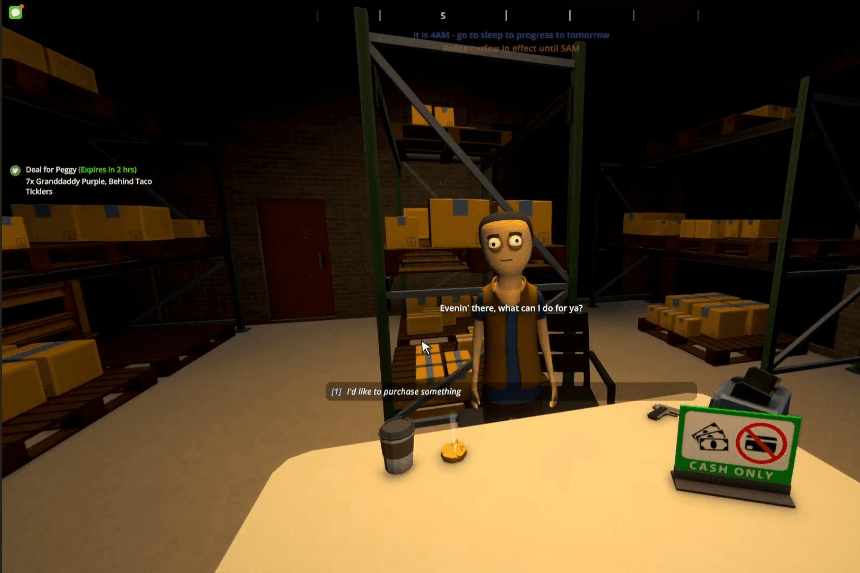
    If you’re looking to buy Acid, Phosphorus, and Gasoline in Schedule 1 then you’ve come to the right place. This guide will walk you through the exact location of the warehouse, how to find the vendor, and what you need to complete the purchase. 

    How to Buy Acid, Phosphorus, and Gasoline from Oscar’s Store

    To purchase Acid, Phosphorus, and Gasoline, you’ll need to visit Oscar’s Store, a black market shop that opens only after 6 PM. However, access to this store requires reaching a certain rank—likely Level 5, though this isn’t confirmed.

    Once you’ve met the requirements, head to the warehouse at the specified location. Upon arrival, find and speak to the vendor. Keep in mind that transactions here are cash-only, so ensure you have enough funds. In this case, the plan is to purchase five units of the required items.

    That’s all you need to know to complete this task successfully!

    How To Make The Best Strain Mix In Schedule 1

    Tips and Tricks 

    Here are some useful tips and tricks to help you navigate Schedule 1 more effectively:

    • Rank Requirement: While Level 5 is generally believed to be the minimum rank needed to access Oscar’s Store, some players have reported gaining entry as early as Level 4. To be safe, aim for at least Level 5.
    • Cash-Only Transactions: Oscar’s Store does not accept any form of payment other than cash. Make sure to carry enough money, and consider bringing extra to account for potential price variations.
    • Best Time to Visit: The store opens at 6 PM, and arriving soon after increases your chances of finding the items in stock. Some players have noted that supplies may be limited later in the evening.
    • Join Discussions: Get involved in forums and discussions to share experiences and learn new tips. The official Schedule 1 subreddit is a great place for exchanging strategies with other players.
    • Stay Updated: Keep an eye on updates and patches that might introduce new features or changes, helping you adapt your strategies accordingly.

    By keeping these insights in mind, you can efficiently locate Oscar’s Store and purchase the required items without hassle.

    Share. Facebook Twitter Pinterest LinkedIn Tumblr Email
    Ambreen
    • X (Twitter)
    • LinkedIn

    Related Posts

    Frostbitten Paradise Abyss Challenge – Crimson Desert

    April 9, 2026

    Ether Rest Abyss Challenge – Crimson Desert

    April 9, 2026

    Spire of Ringing Truth & Priscus the Ancient Boss Guide – Crimson Desert

    April 9, 2026

    Ice Cradle Abyss Challenge – Crimson Desert

    April 9, 2026
    Add A Comment
    Leave A Reply Cancel Reply

    Editors Picks
    Guides

    Frostbitten Paradise Abyss Challenge – Crimson Desert

    By Dusa Praharsh
    Guides

    Ether Rest Abyss Challenge – Crimson Desert

    By Dusa Praharsh
    Guides

    Spire of Ringing Truth & Priscus the Ancient Boss Guide – Crimson Desert

    By Dusa Praharsh
    Guides

    Ice Cradle Abyss Challenge – Crimson Desert

    By Dusa Praharsh
    Guides

    Altar of Solitude Abyss Challenge – Crimson Desert

    By Dusa Praharsh
    Patch Crazy
    Facebook X (Twitter) Instagram Pinterest Vimeo YouTube
    • Home
    © 2026 PatchCrazy.

    Type above and press Enter to search. Press Esc to cancel.