
V.A.C. indicators can be tough. But once you understand how the color logic works and where to find the right hints, it’s easy. If you are struggling with the Breaker Box puzzle in Blue Prince.This guide will walk you through everything you need to know to solve.
How to Solve Breaker Puzzle (V.A.C Indicators)
To solve the Utility Closet Fusebox puzzle, you’ll need to track down a couple of key hints, these can be found in two specific rooms:
- The Office
- The Mail Room
The Office
Start with The Office. Head over to the computer there and select “Login to Network.” When prompted, enter the Terminal Password, which is swansong.
You can spot this password (crossed out) on various Staff Notices scattered around the manor, including locations like:
- The Commissary
- The Laboratory
- The Office
- Security
- The Shelter
To actually read the crossed-out password on these notices, you’ll need a Magnifying Glass.
Note:
- The password isn’t case-sensitive
- You don’t need to find it in-game to use it
- It works on every computer in the manor, and never changes
Once you’re logged into the network, you’ll see a few menu options like Staff Services and Remote Terminal Access, but for the Fusebox puzzle, just focus on “Electronic Mail.”
There are two important emails to read:
- “Re: Re: fusebox repair” – This one gives you the V.A.C. indicator sequence:
[off] [blue] [green] [white] [red] [purple] - “Re: fusebox repair” – This message tells you that you can turn an indicator white by syncing all six V.A.C. buttons to purple.
That’s everything you can gather from The Office to help with the Utility Closet puzzle.
The Mail Room
The hint in the Mail Room is much simpler to deal with. Just explore the room and look for a letter titled “Utility Room Fusebox.” This document gives you a clear explanation of how the color-mixing mechanics work for the puzzle.
Here’s a quick breakdown of the important info:
- If all the indicators start out green, press any of them to turn it blue.
- Press a blue indicator next to a red one, and the two will combine to make purple.
- You’ll need to create five purple lights before you can activate the sixth one.
That’s all you need from the Mail Room to understand how the puzzle’s color logic works.
Solving the Breaker Puzzle
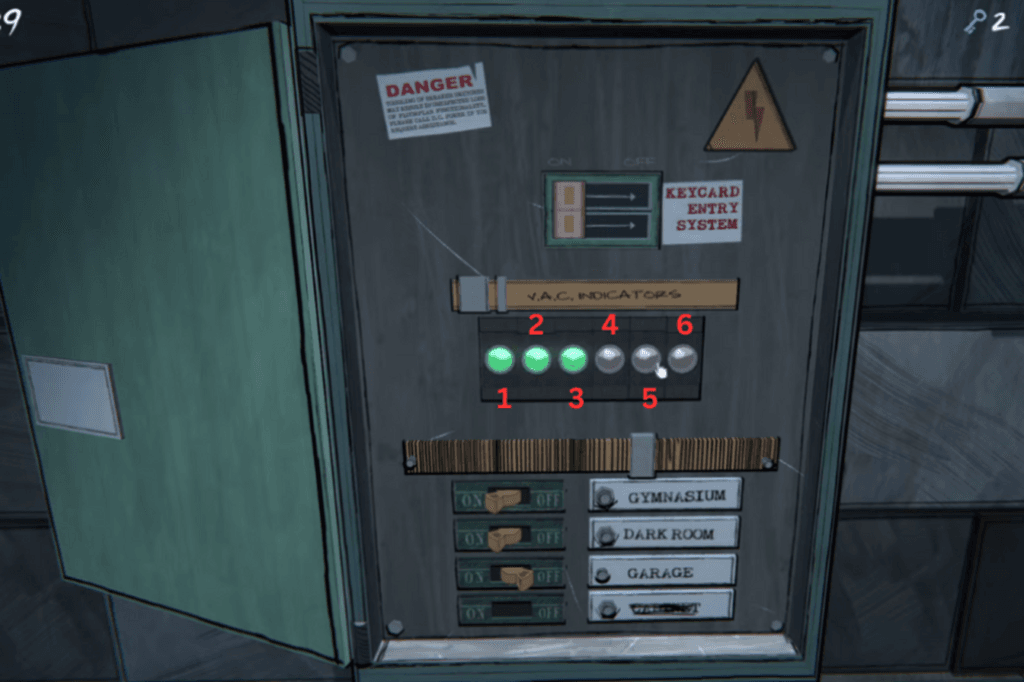
To solve the Breaker Box puzzle, you’ll need to set the V.A.C. indicators to follow this color order:
- Gray
- Blue
- Green
- White
- Red
- Purple
In the image, the indicators are labeled 1 through 6 to help you follow along step-by-step. Here’s a clear walkthrough of what to do:
Step-by-Step Solution:
- Start by pressing all the V.A.C. indicators once. They should all turn green.
- Now, press the first indicator again. It will turn blue, and the rest will turn red.
- Press the blue (first) indicator to turn it off. This will also turn the red indicators next to it purple.
- Press the first indicator two more times to make it red again. Then, press the purple indicator to turn it blue. Press it once more, and the red indicators next to it will also turn purple. The second indicator should now be off.
- Press the second indicator twice to turn it red again. Then press the third indicator once to turn it blue.
- Press the third indicator one more time, this will turn the indicators next to it purple.
- Repeat the steps above (steps 4–6) for the next set of indicators, until all are purple except for the last one, which should still be off.
- Press the last indicator three times to make it purple.
- Once all indicators are purple, click the fourth one. It will turn white.
- Now, click the third indicator three times to make it green, and the second one will become blue.
- Click the first indicator twice to turn it off.
- Press the fifth indicator once to make it blue. Then press the last indicator four times to turn it red.
- Press the fifth indicator again, this will turn the last one purple.
- Finally, press the fifth indicator two more times. Puzzle complete.
Once all indicators are in the correct color sequence, the wall behind the Fusebox will lift. Walk around to the back of the box and you’ll find a yellow lever with a lightning bolt symbol on it.
Flip the lever to unlock the Gemstone Cavern. Starting the next in-game day, you’ll receive two gems daily as a reward for completing the puzzle.
