
Encountering your opponents’ teams in MW4 DMZ does not necessarily mean that you will have to engage them in a battle. In MW4 DMZ, it is possible to ask for a truce from other players through the Ping Wheel. It is also possible for you to accept a truce request from other players if you do not want to battle them. Here’s how to use the Ping Wheel to request or accept a truce in MW4 DMZ.
Friendly Face Challenge – Use The Ping Wheel To Request A Truce
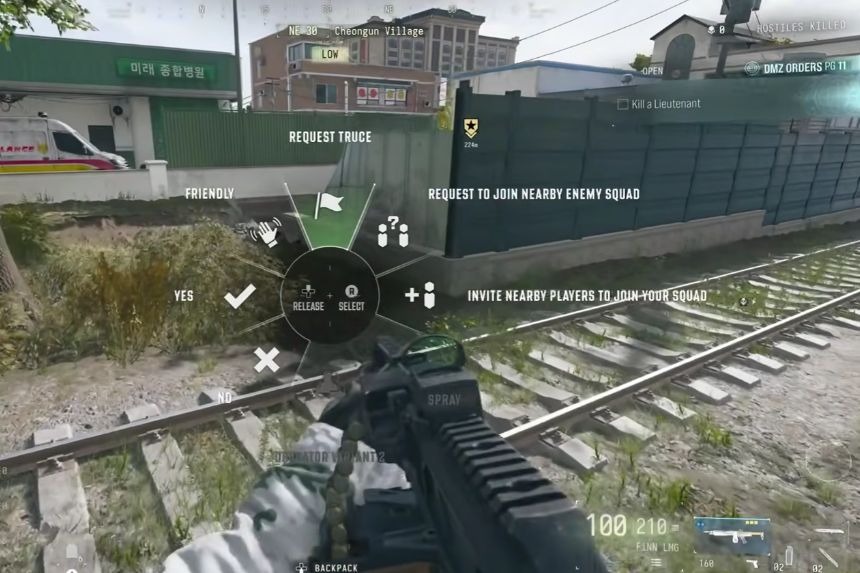
In order to successfully play through the “Friendly Face” mission in MW4 DMZ, the player must first employ the Ping Wheel to make peace. This will inform the surrounding players that you are friendly and do not wish to engage. But ultimately, the choice of whether they honor the peace or kill you is up to the other players. In order to start the process, the player needs to activate the Ping Wheel. If the game is being played using a PlayStation console, the Up button on the D-pad will open it. This is the very same menu where one gives commands or requests to join other squads.
To ask for a truce, start by getting close to the enemy operators that you would like to talk to. When you have reached their proximity, press the Up button on the D-pad to activate the Ping Wheel. After that, go to the top of the wheel and select the Truce option. You will get an option for truce on the map, which will make the nearby enemy teams understand that you would like to stop fighting. Selecting this option will help you put up a white flag, which tells the other players within 250 meters of your position that you have asked for a truce.
This is all that you have to do in order to finish the Friendly Face challenge. There is no requirement for acceptance from another player’s side. Keep in mind that there is a 200-second cooldown on the truce option.
How To Use The Ping Wheel To Accept A Truce
In case there is a call for truce from some other squad, then it can be accepted via the use of Ping Wheel. This can be done by first locating the Truce marker that is laid down by the opposing squad and then by pressing the Up button on the D-Pad while looking at the Truce marker. There will be a white icon that will appear over the heads of the friendly operators in case of truce between two squads. This will help to differentiate between those who have accepted your truce and thus prevent them from any accidental attack. Even if you or the other party had called for a truce, the enemy is still allowed to fire at their own will, so you need to be careful who you wish to use the truce on while playing DMZ.
