
Close Menu

    Subscribe to Updates

    Get the latest creative news from FooBar about art, design and business.

    What's Hot

    Wardogs: Best Recon Sniper Loadout

    September 17, 2026

    How to Request Pickups, Drop-offs, and Supplies in Wardogs

    September 17, 2026

    How To Breach Walls in WARDOGS

    September 17, 2026
    Facebook X (Twitter) Instagram
    Patch Crazy
    • Guides
    • Server Status
    • Patch Notes
    • Privacy Policy
    Facebook X (Twitter) YouTube Reddit
    Patch Crazy
    Home»Guides»How to Request Pickups, Drop-offs, and Supplies in Wardogs
    Guides

    How to Request Pickups, Drop-offs, and Supplies in Wardogs

    By SinigaSeptember 17, 2026No Comments2 Mins Read
    Share
    Facebook Twitter LinkedIn Pinterest Email

    In Wardogs, being able to ask for a pickup, drop-off, and supplies can be very helpful in the middle of the game. If you want a lift to get to your destination or need a helicopter dropped off in a particular place or supplies sent to you, all of these can be requested quickly. In this guide, you will learn how to do all that.

    How to Request a Pickup
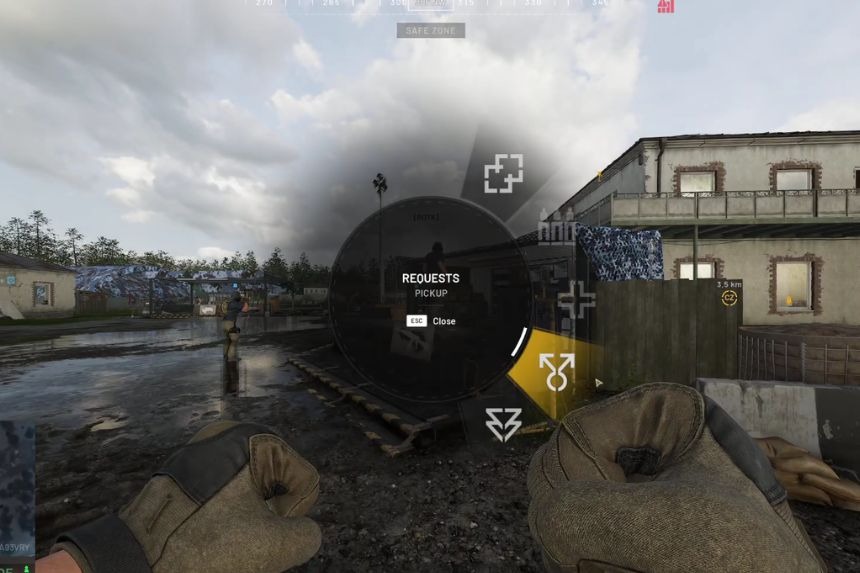
    In case you get stranded at a particular spot on the map and require transportation, Wardogs offers you the opportunity to make a pickup request from any nearby pilot or driver. It is quite easy.

    As long as you are within the circle, press the Middle Mouse Button and a request menu will pop up. Click on Request and then choose Request Pickup. After you make the request, any available pilot or driver on the map will receive it. After that, he will approach you to take you along. Even if you die prior to sending the request, you can do it from the spawn screen.

    How to Request a Drop-Off
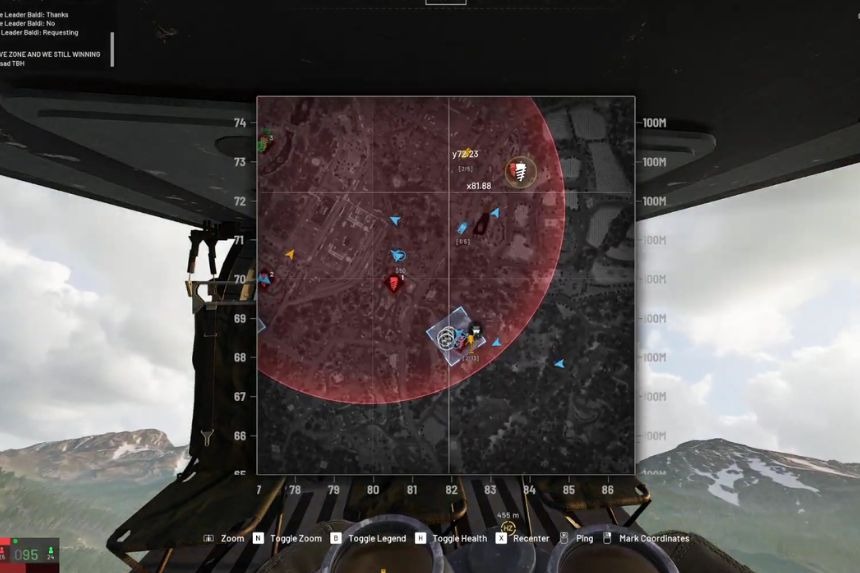
    When riding in a helicopter, if you wish to stop in a particular spot, all you have to do is ask for a drop-off in Wardogs.

    In the helicopter, click on the map with the right mouse button to put a mark on the spot where you want to land. After that, choose the option “Request Drop-Off.”

    The driver will see the mark on the map and will be able to take you there. Once you arrive, you can just jump from the helicopter and go on your way on foot.

    How to Request Supplies
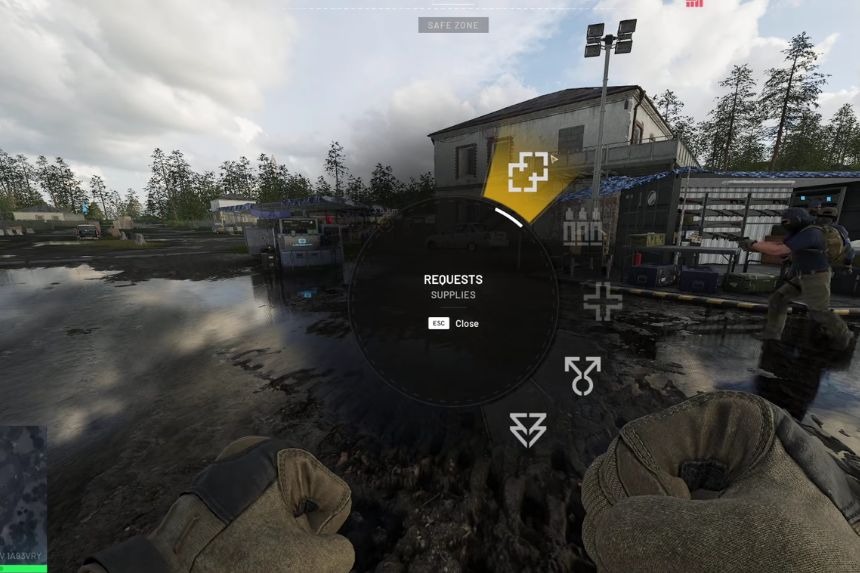
    If you require additional supplies while playing Wardogs, you can get them by requesting them straight from the map. It is a fast and simple process. First, press down the Middle Mouse Button to get into the requesting mode. Second, drag your mouse to the right and click on Request.

    Now, you should go to Request Supplies. Your location will show up on the map after making the request. This means that pilots, drivers, and other players will know where the supplies have to be dropped. All you have to do is wait at your location.

    Share. Facebook Twitter Pinterest LinkedIn Tumblr Email
    Siniga

      A passionate gamer and writer who believes gaming is more than just a hobby - it’s my second life (and sometimes my escape from the first!). I love exploring new worlds, chasing good stories, and turning my gaming adventures into words for fellow gamers.

      Related Posts

      Wardogs: Best Recon Sniper Loadout

      September 17, 2026

      How To Breach Walls in WARDOGS

      September 17, 2026

      How to Build a CWIZ Bunker in Wardogs

      September 17, 2026

      Wardogs Helicopter Guide – How to Use, Best Settings, and More

      September 17, 2026
      Add A Comment
      Leave A Reply Cancel Reply

      Editors Picks
      Guides

      Wardogs: Best Recon Sniper Loadout

      By Siniga
      Guides

      How to Request Pickups, Drop-offs, and Supplies in Wardogs

      By Siniga
      Guides

      How To Breach Walls in WARDOGS

      By Siniga
      Guides

      How to Build a CWIZ Bunker in Wardogs

      By Siniga
      Guides

      Wardogs Helicopter Guide – How to Use, Best Settings, and More

      By Siniga
      Patch Crazy
      Facebook X (Twitter) Instagram Pinterest Vimeo YouTube
      • Home
      © 2026 PatchCrazy.

      Type above and press Enter to search. Press Esc to cancel.