
Close Menu

    Subscribe to Updates

    Get the latest creative news from FooBar about art, design and business.

    What's Hot

    How To Save Josee in Code Vein 2 

    February 2, 2026

    Should You Save Noah in Code Vein 2

    February 2, 2026

    Bloodedge Demon Location in Nioh 3

    February 2, 2026
    Facebook X (Twitter) Instagram
    Patch Crazy
    • Guides
    • Server Status
    • Patch Notes
    • Featured
    • News
    • Reviews
    Facebook X (Twitter) Instagram
    Patch Crazy
    Home»Guides»How to Buy and Equip Accessories in NBA 2k26
    How to Buy and Equip Accessories in NBA 2k26
    Guides

    How to Buy and Equip Accessories in NBA 2k26

    By SankarSeptember 1, 2025No Comments2 Mins Read
    Share
    Facebook Twitter LinkedIn Pinterest Email

    If you want to make your MyCareer player look better in NBA 2K26, here’s how to do it.  You can buy and wear accessories like leg sleeves, wristbands, headbands, and more. In this guide, we will show you how to find the NBA Store, buy the items you like, and put them on your player, step by step.

    How to Buy and Equip Accessories in NBA 2K26

    To buy and equip accessories in NBA 2K26 you need to first open your map. To open the map on PlayStation, you need to press the big button in the middle of your controller. To open the map on your Xbox, hit the small button below the Xbox logo (the one with two little squares).


    How to Buy Accessories in NBA 2K26
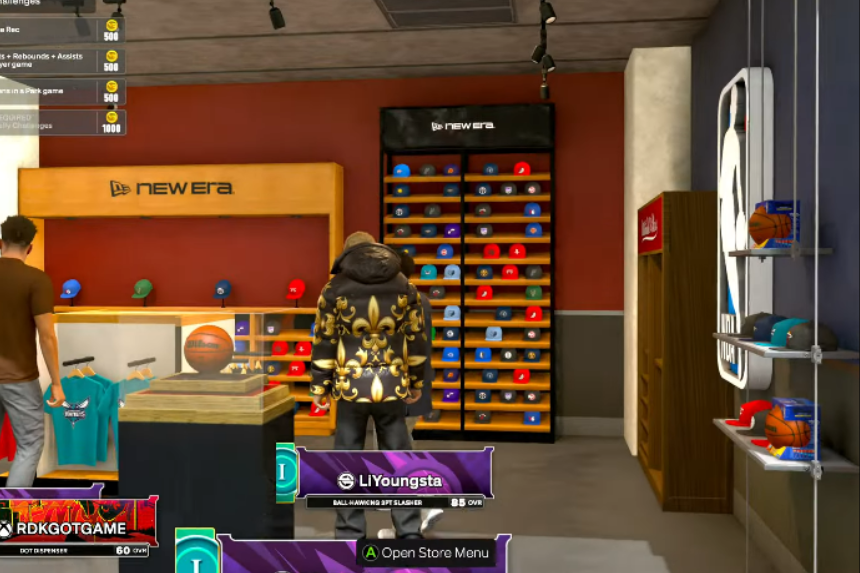
    To buy accessories, look for the NBA Store on the map. It should be easy to spot, usually right in front of you. You can also set a waypoint if you want. Once you are inside the store, here’s how to buy accessories:

    • Open the menu.
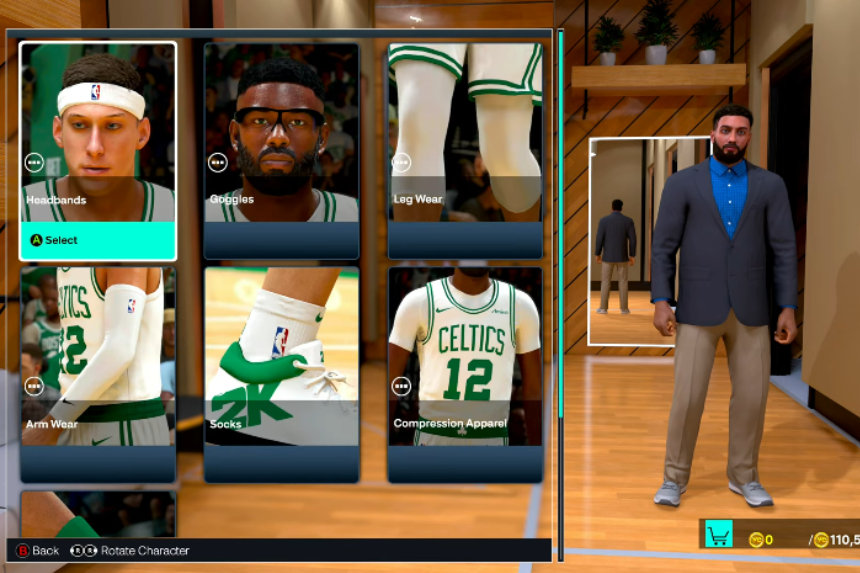
    • Then go to “NBA”, then “NBA On-Court”.
    • Browse the accessories and choose whatever you like, leg sleeves, wristbands, headbands, short shorts, etc.
    • When you are ready to buy, press Triangle (PlayStation) or Y (Xbox) to check out and confirm your purchase.

    How to Equip Accessories in NBA 2K26

    Now, to equip accessories in NBA 2K26:

    • Press Start, go to “MyPlayer”, then “Appearance”.
    • From there, open “On-Court Accessories”. You will see all the items you just bought. 
    • Go ahead and equip them. After this, your player will now hit the court in style.

    And that’s it. Now, you know how to buy and equip accessories in NBA 2K26. You can customise your MyCareer player to look exactly how you want. Just follow these steps, and you will be ready to show off your style on the court.

    Share. Facebook Twitter Pinterest LinkedIn Tumblr Email
    Sankar
    • X (Twitter)
    • LinkedIn

    Decided that degrees were as useful as extra lives in a Mario game-totally unnecessary! I’m diving into the extravagant universe of my favourite game, Assassin’s Creed, which lets me roam the world without actually paying for plane tickets. Hodophile by nature and aspiring to get lost in Hang Sơn Đoòng cave in Vietnam someday!

    Related Posts

    How To Save Josee in Code Vein 2 

    February 2, 2026

    Should You Save Noah in Code Vein 2

    February 2, 2026

    Bloodedge Demon Location in Nioh 3

    February 2, 2026

    Cairn – 15 Best Tips & Tricks for Beginners

    February 2, 2026
    Add A Comment

    Comments are closed.

    Editors Picks
    Guides

    How To Save Josee in Code Vein 2 

    By Nandita
    Guides

    Should You Save Noah in Code Vein 2

    By Nandita
    Guides

    Bloodedge Demon Location in Nioh 3

    By Ambreen
    Guides

    Cairn – 15 Best Tips & Tricks for Beginners

    By Ambreen
    Guides

    How To Save Lyle in Code Vein 2

    By Nandita
    Patch Crazy
    Facebook X (Twitter) Instagram Pinterest Vimeo YouTube
    • Home
    © 2026 PatchCrazy.

    Type above and press Enter to search. Press Esc to cancel.