
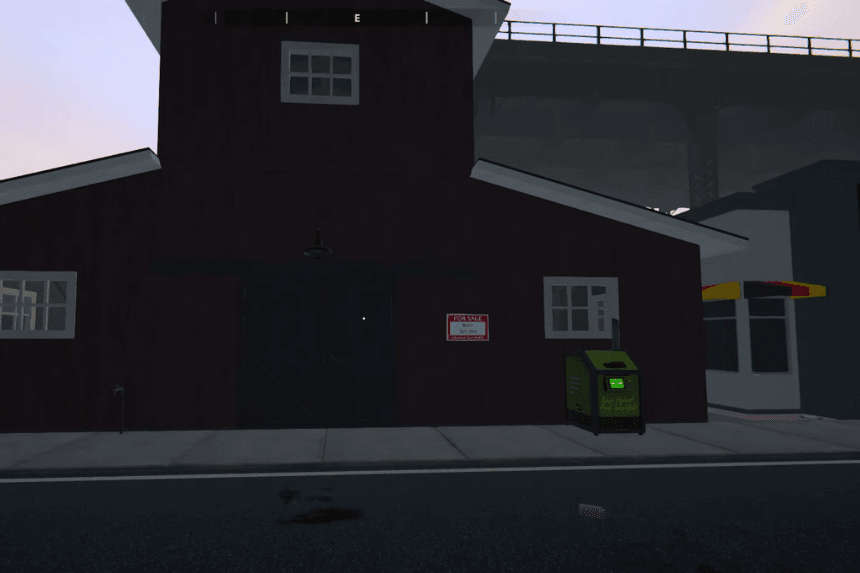
The “Schedule 1” game offers players a unique simulation experience, and as players progress, the need for more space becomes crucial. While the initial Bungalow provides a starting point, the Barn offers a significant upgrade, allowing for expanded operations. However, the Barn isn’t a standard feature; it requires a mod to be unlocked. This guide will walk you through the necessary steps to install the mod, purchase the Barn, and effectively utilize its space, transforming your gameplay experience.
How To Get Barn
The barn is a massive property in Schedule 1 that offers a much larger space compared to the Bungalow house. To unlock and access the barn, follow this step-by-step guide.
Step 1: Install the Barn Mod
Since the barn is not available in the base game, you must install a mod to add it to your map.
1. Download Melon Loader
- Visit the official Melon Loader website (link provided in the video description).
- Download and install Melon Loader.
- Launch Melon Loader and select Schedule 1 as the game to mod.
- Click “Install” to complete the setup.
2. Download the Barn File
- Download the barnmove.dll file from the provided Dropbox link.
- This file is necessary for adding the barn to your game.
Step 2: Place the Mod Files Correctly
1. Locate Your Game Files
- Press Win + R and type appdata, then hit Enter.
- Navigate to LocalLow > TVGS > ScheduleOne > Free Sample > Saves > Properties.
- Paste the barnmove.dll file into the Properties folder.
2. Add the Barn File to Melon Loader Mods Folder
- Open Melon Loader.
- Click the file icon and locate the Mods folder.
- Paste the barnmove.dll file into the Mods folder.
Step 3: Purchase the Barn
- Launch Schedule 1 and head to the top-right of the map.
- The barn is now available for purchase at $25,000.
- Once purchased, you can start moving your equipment and setting up your grow operation.
Step 4: Setting Up Your Barn
- Organize your space efficiently to maximize production.
- Consider setting up grow kits, dispensers, and storage areas.
- Arrange everything in a way that allows easy maneuvering.
The barn is a game-changer in Schedule 1, providing ample space and efficiency for your operations. If you encounter any issues during installation, double-check the file placements or leave a comment in the video for further assistance.
