
Close Menu

    Subscribe to Updates

    Get the latest creative news from FooBar about art, design and business.

    What's Hot

    Kids Aren’t Alright Quest Guide – Quarantine Zone: The Last Check

    January 21, 2026

    All Endings in Quarantine Zone: The Last Check

    January 21, 2026

    Scout 8 Manhunt Riddle Solutions – The Division 2 Y7S3

    January 21, 2026
    Facebook X (Twitter) Instagram
    Patch Crazy
    • Guides
    • Server Status
    • Patch Notes
    • Featured
    • Reviews
    Facebook X (Twitter) Instagram
    Patch Crazy
    Home»Guides»How to Change Hunter and Palico Appearance in Monster Hunter Wilds
    How to Change Hunter and Palico Appearance in Monster Hunter Wilds
    Guides

    How to Change Hunter and Palico Appearance in Monster Hunter Wilds

    By NanditaFebruary 28, 2025No Comments3 Mins Read
    Share
    Facebook Twitter LinkedIn Pinterest Email

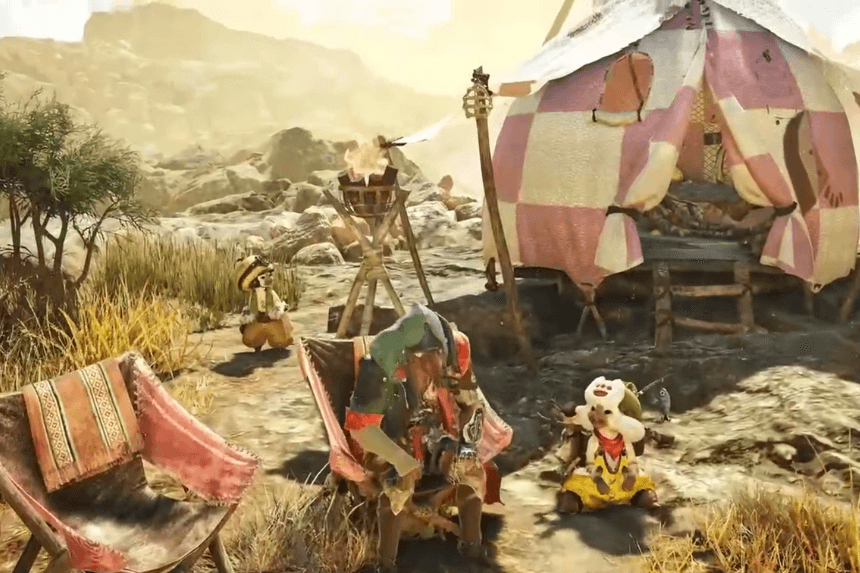
    In Monster Hunter Wilds, your Palico and hunter are not just travel companions on your quest they’re a reflection of your style and personality. What if, though, you decide you want to shake things up after launching your quest, though? Either a quick touch-up or complete makeover, the game has two methods of altering their look. One method is fast and simple, available right from your tent, while the other allows for more in-depth changes using special edit vouchers. Let’s break down both options so you can keep your characters looking exactly how you want! 

    How to Change Hunter and Palico Appearance

    Knowing how to change your hunter and Palico’s appearance in Monster Hunter Wilds is helpful sometimes, you just want their look to match their progress in the journey or better complement the armor they’re wearing. There are two ways to change the look of your hunter and Palico after you’ve created them and started your save file. The first way lets you make more significant changes, but you’ll need character and Palico edit vouchers to do it. The second option is more limited, but you can access it anytime from your tent no vouchers needed.

    Monster Hunter Wilds: Server Status, Maintenance, and Downtime

    How to change Appearance without a Voucher

    To quickly and easily change your hunter and Palico’s appearance, go to your tent. Inside, navigate to the “Appearance Menu” and select “Change Appearance”.

    This opens a character editor where you can adjust:

    • Hair
    • Makeup
    • Posture (called “bearing” in the game)
    • Underclothes
    • Facial hair
    • Mouth shape

    Limitations: You cannot change the following:

    • Face shape
    • Skin tone
    • Gender
    • Hunter’s name

    While in the tent, you can also change your hunter’s equipment appearance. This includes layered armor, which lets you customize your hunter’s look without affecting their stats.

    How to change Appearance with a Voucher

    There’s a more thorough way to edit your hunter or Palico through the save data menu.

    This method requires a character edit voucher or a Palico edit voucher.

    To use a voucher and edit your character:

    1. Launch Monster Hunter Wilds.
    2. Select “Start Game”.
    3. In the save data menu, highlight the file with the hunter or Palico you want to edit.
    4. Press the appropriate button to edit the character (on PlayStation 5, it’s the square button).

    You’ll then choose whether you want to edit your hunter or Palico.

    This method also lets you change their names — something you can’t do through the tent’s appearance menu.

    Share. Facebook Twitter Pinterest LinkedIn Tumblr Email
    Nandita
    • X (Twitter)
    • LinkedIn

    Damsel in her own distress, abodes in her imaginary world, and enchanted by the magical realms of Elden Ring. A professional overthinker who loves to weave captivating stories, and is fascinated by the art of doing nothing. When not lost in thought, paints canvases that echo her wildest daydreams!

    Related Posts

    Kids Aren’t Alright Quest Guide – Quarantine Zone: The Last Check

    January 21, 2026

    Scout 8 Manhunt Riddle Solutions – The Division 2 Y7S3

    January 21, 2026

    All School Outfits Location in Heartopia 

    January 21, 2026

    How to Get All Heartopia Pets

    January 20, 2026
    Add A Comment
    Leave A Reply Cancel Reply

    Latest Posts

    Kids Aren’t Alright Quest Guide – Quarantine Zone: The Last Check

    January 21, 2026

    Scout 8 Manhunt Riddle Solutions – The Division 2 Y7S3

    January 21, 2026

    All School Outfits Location in Heartopia 

    January 21, 2026

    How to Get All Heartopia Pets

    January 20, 2026
    Top Reviews
    70
    Reviews

    Review: Dunecrawl, Is It Worth It

    By Sankar
    Patch Crazy
    Facebook X (Twitter) Instagram Pinterest Vimeo YouTube
    • Home
    © 2026 PatchCrazy.

    Type above and press Enter to search. Press Esc to cancel.