
Close Menu

    Subscribe to Updates

    Get the latest creative news from FooBar about art, design and business.

    What's Hot

    Melt Knight Location in Of Ash and Steel

    January 25, 2026

    Chad’s Order Attire Quest: Of Ash and Steel 

    January 25, 2026

    Distribute the Handouts Quest in Of Ash and Steel

    January 25, 2026
    Facebook X (Twitter) Instagram
    Patch Crazy
    • Guides
    • Server Status
    • Patch Notes
    • Featured
    Facebook X (Twitter) Instagram
    Patch Crazy
    Home»Guides»Best Graphics Settings for Schedule 1
    Best Graphics Settings for Schedule 1
    Guides

    Best Graphics Settings for Schedule 1

    By AmbreenApril 7, 2025No Comments2 Mins Read
    Share
    Facebook Twitter LinkedIn Pinterest Email

    If Schedule 1 is running on your PC like it’s powered by a toaster, you’re definitely not the only one. The game isn’t fully optimized yet, so even solid systems can have trouble. Here’s a straightforward graphics settings guide aimed at boosting performance—so you can actually enjoy playing instead of watching a laggy slideshow.

    Graphics Settings
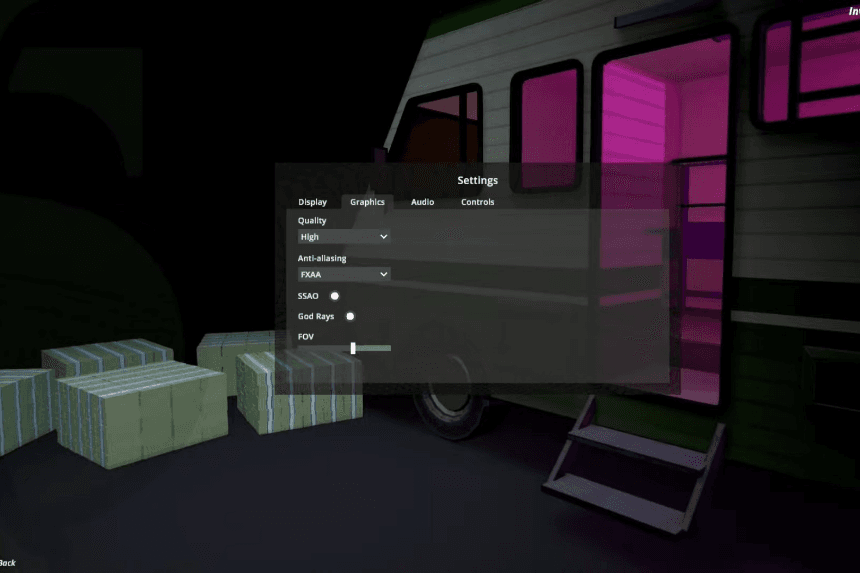
    Optimized for Performance:

    • Quality: Medium – strikes a good balance between visuals and smooth gameplay.
    • Anti-Aliasing: Off – turning this off can greatly boost performance.
    • SSAO (Ambient Occlusion): Off – minor visual benefits, major FPS drop.
    • God Rays: On – adds some flair, but feel free to disable if needed.
    • FOV: Your call, but a wider FOV might slightly reduce performance.

    Display Settings

    Recommended Values:

    • Resolution: Stick to your monitor’s native resolution unless performance is really rough—then consider lowering it.
    • Display Mode: Exclusive Fullscreen – usually delivers the best performance.
    • VSync: Off – helps reduce input lag and can improve FPS.
    • Interface Scale: 45% to 50% – keeps UI readable without overwhelming the screen.
    • Target Framerate: 40% – oddly enough, this setting works best for now.
    • Camera Bobbing: 70% – tweak based on personal comfort; lowering it may improve motion clarity.
    How to Make Your Weed Factory Automatic in Schedule 1

    Bonus Tips

    • If the game won’t start or stutters on launch, try running it as an administrator.
    • Disable overlays (like Discord, NVIDIA, or Steam) while playing—they can cause lag.
    • Still getting poor performance on a decent setup? Try dropping your resolution by one step.

    Conclusion: Schedule 1 isn’t overly demanding, but since it’s still in early access, you can expect some bugs and performance hiccups. These settings should help stabilize things so you can enjoy the chaos without your PC sounding like it’s ready for takeoff. And if it’s still rough, hang tight—performance patches are probably just around the corner.

    Share. Facebook Twitter Pinterest LinkedIn Tumblr Email
    Ambreen
    • X (Twitter)
    • LinkedIn

    Related Posts

    Melt Knight Location in Of Ash and Steel

    January 25, 2026

    Chad’s Order Attire Quest: Of Ash and Steel 

    January 25, 2026

    Distribute the Handouts Quest in Of Ash and Steel

    January 25, 2026

    Special Invitation Quest Guide in Of Ash and Steel

    January 25, 2026
    Add A Comment
    Leave A Reply Cancel Reply

    Editors Picks
    Guides

    Melt Knight Location in Of Ash and Steel

    By Nandita
    Guides

    Chad’s Order Attire Quest: Of Ash and Steel 

    By Nandita
    Guides

    Distribute the Handouts Quest in Of Ash and Steel

    By Nandita
    Guides

    Special Invitation Quest Guide in Of Ash and Steel

    By Nandita
    Guides

    The Long Road Home Quest Guide – Of Ash and Steel

    By Nandita
    Patch Crazy
    Facebook X (Twitter) Instagram Pinterest Vimeo YouTube
    • Home
    © 2026 PatchCrazy.

    Type above and press Enter to search. Press Esc to cancel.