

Another fun activity in GTA 6 is buying houses and garages; this allows players to have their own property and create space for their cars. Nevertheless, it is not possible to buy them at once because the Vice City Real Estate application will be unlocked only while following the story mode. In this guide, we’ll show you how to unlock the app, find available garages, and purchase extra parking space for your cars.
How To Buy Houses & Garages
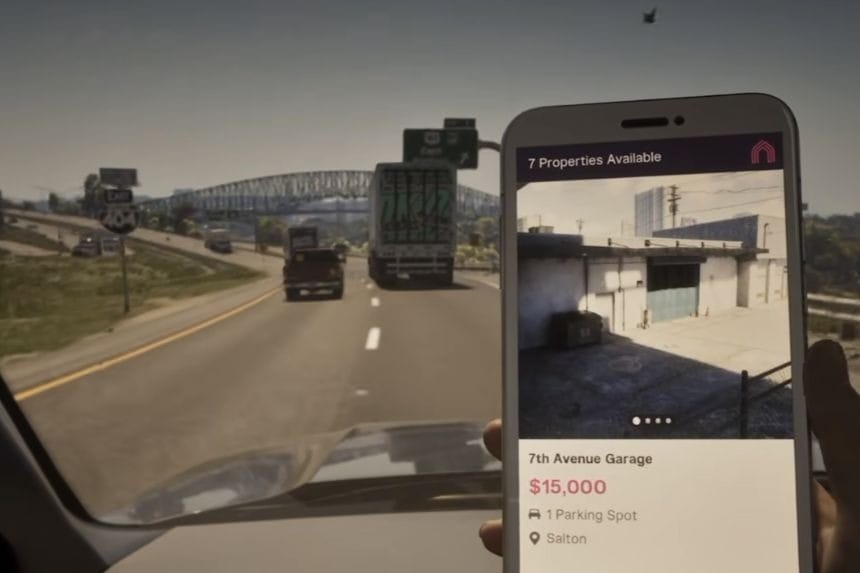
Various property types are available in GTA 6; these include both garages and houses. You will need to open your mobile application by clicking on the GTA 6 phone icon, then selecting Vice City Real Estate. Remember, Vice City Real Estate may not yet be available, so you may have to advance in the storyline first. After accessing the application, you will see several properties listed. You can purchase garages, and other properties such as houses may be available depending on your progress in the game.
It is highly recommended to buy a garage because it enables you to have additional space to park your vehicles. To purchase a property, select the property you wish to buy, make it your destination and drive to its location for inspection. Upon arriving at the selected property, you can go ahead and purchase it. There are eight garages in total, and their cost depends on their locations.
How to Unlock the Vice City Real Estate App
First of all, you have to finish the second chapter in order to proceed through Moses’s questline. Moses is the mechanic who teaches you how to steal cars, register them, and store them. Finish all the missions of this character until you get to the Daily Driver mission and collect the Crawler for him.
After you do that, you will get a notification about the appearance of the application on your mobile phone called Vice City Real Estate. It is the application you need to purchase more garages. If you don’t see that app on your phone, check whether you’ve done the Daily Driver mission yet.
How to Purchase a Garage
Once you have selected the garage that you require, you will click on the list and then make it your destination. Just follow the icon on the map until you get there. Once there, proceed to the viewing area and click on it. Ensure that you have enough cash to buy the garage before clicking on it for purchase. This is all you need to do to add another garage in GTA 6.
