
In AION 2, players can modify the looks of their characters’ equipment to suit their tastes. Players can alter the way that their equipment looks without changing its properties. The equipment can be dyed, have patterns added, and gain new appearances through acquiring new items. Here’s how the gear customisation system works and how you can use it.
How To Customise Your Gear
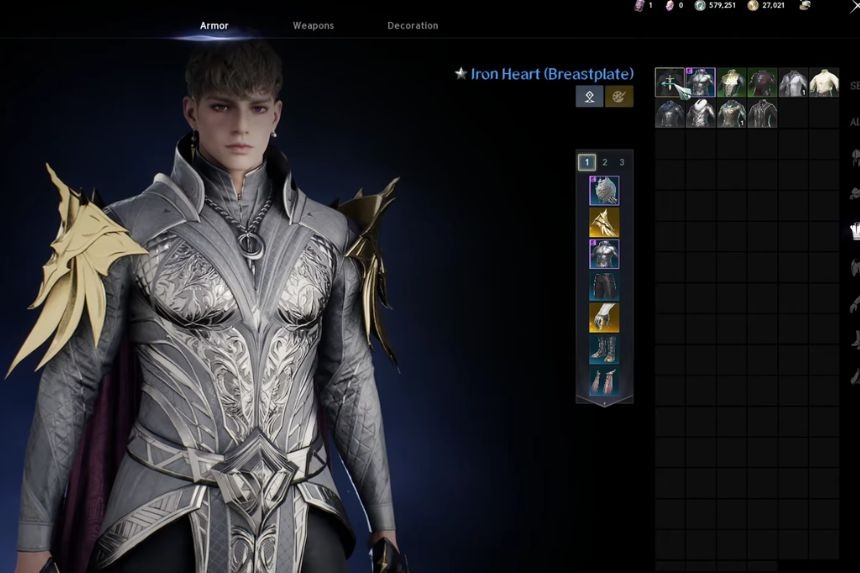
The appearance of your armour, weapons, and decorations can be changed in AION 2 in order to modify the look of the equipped gear, while not affecting the stats of the gear itself. There are several possibilities for modification, which are described poorly by the game developers.
Firstly, you should open the main menu and go to the Closet in the upper part of the window. In Closet, you will be able to modify the appearance of your armour, weapons, and decorations. You should pick an armour piece which you want to change. For instance, you can choose the chest armour in order to modify the appearance of your chest armour.
After selecting the necessary armour piece, you will be able to modify the appearance of your character only. That is, it will not affect the actual gear which is equipped on your character and will not modify the stats of the equipped gear.
In case you wish to make the modification even more detailed, select the armour piece and press the Customise button. All the items with the pink or purple borders are applied to the current gear in order to change the appearance of the gear.
How To Dye Gear in AION 2
Through the customise menu, you will be able to give your equipment a more personalised look. Through it, you will be able to modify the colour of certain pieces of your equipment and pick different materials for your armour. The patterns can be added or modified. Among the things that you will be able to tweak through the pattern modifications are colour, width, height, and opacity.
When you are satisfied with the look of your equipment, you can now purchase the modification. This requires the use of a Customisation Pass. Should you lack Customisation Passes, you can spend 200 Quna for that, and it costs real money to purchase Quna currency in AION 2. The same customisation can be done with your weapons and decorations. Just go into the Closet, select the piece of equipment, click on Customise, and then proceed with your customisation.
How To Unlock More Closet Appearances
You can create additional appearances for yourself from the Cube by extracting objects which you do not yet have. To extract an object, you will need to go to the Cube menu and click on Extract. If you manage to extract something which does not yet exist in your Closet, you will get all necessary materials and gain access to that object’s appearance.
This works for armour, weapons, and decorations, so extracting new items is a good way to expand your customisation options. Extraction does cost some Kina, which will be shown in the Extraction page during the process. Once you have more appearances unlocked, you can mix and match them to create the look you want without affecting the stats of your actual equipment.
