

Highlights
- You may see a run restriction error in Marathon when your vault storage becomes full.
- A full vault usually happens when claiming reward packs or collecting too many items.
- You can remove unwanted gear from your vault and then claim the items in the Overflow.
If you play Marathon, you may sometimes see a message saying you cannot start a run because your vault space is full. This happens when you collect a lot of gear or claim a reward pack that adds many items to your storage. When the vault is full, the game will stop you from entering a match until you free up some space. In this guide, we will tell you how to increase vault space in Marathon.
How to increase vault space
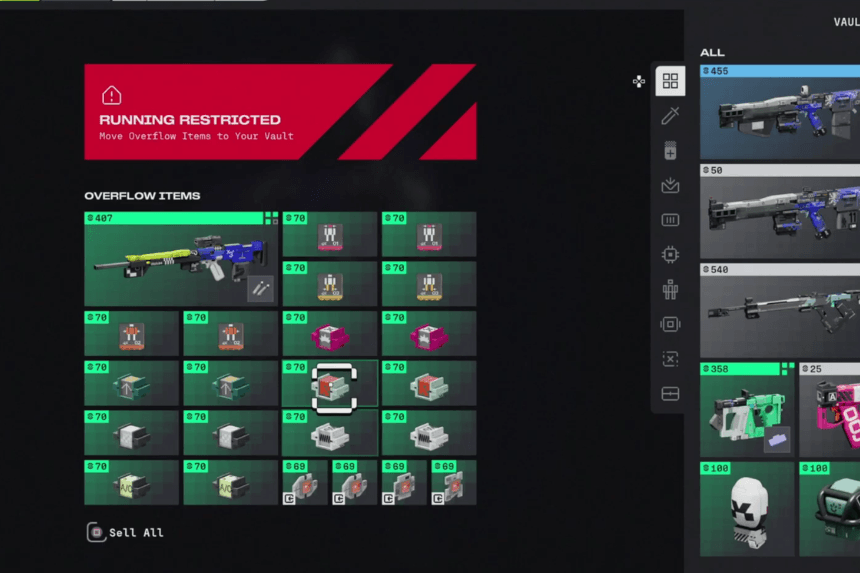
In Marathon, sometimes you will see a message saying you cannot start a run because your vault space is full. Until you clear or expand your storage, the game will show an error saying your run is restricted because the vault is full.
The best way to solve this problem is by upgrading your vault. Open the Faction menu and go to the Upgrade section. Look for the first upgrade, which expands your vault inventory space and purchase the upgrade to add extra rows of storage to your vault.
If you cannot upgrade immediately, sell all the extra items. Go to the Overflow section in your inventory. Here, you will see all the items that were added after your vault becomes full. At the bottom of the screen, you can use the Sell All option to remove these items and free up space.
Another option is to clear some space so open your Vault and look through your stored gear. Sell or discard items you no longer need, and after freeing the space, go back and claim the items from the Overflow section.
FAQs
- What is the Overflow section in Marathon?
- The Overflow section stores items that cannot fit in your vault when it becomes full.
- What materials are required to upgrade vault space in Marathon?
- You need Credits, Unstable Diodes, and Gunmetal to upgrade vault space in Marathon.
- What should you do if your vault is full and you cannot upgrade it yet?
- Go to the Overflow section and use all options to remove extra items quickly.
